
Oleh Ziyara.io Terakhir diperbarui 29 September 2026
Di halaman ini
Manifes adalah dokumen paling tak kenal ampun yang dibuat travel umroh. Daftar kamar dibaca manusia di ujung sana; manifes diperiksa sistem — dicocokkan dengan paspor yang terbaca mesin, dengan toleransi nol. Satu karakter salah bisa berarti seorang jamaah diperdebatkan di konter check-in sementara enam puluh orang menonton.
Apa itu manifes, dan siapa yang memintanya
Manifes penumpang rombongan adalah daftar terstruktur semua orang di satu penerbangan — berkas yang diminta maskapai atau konsolidator Anda sebelum tenggat penyerahan nama. Tergantung pengaturan Anda, versi data yang sama juga dikirim ke operator darat Saudi dan ke pemrosesan visa.
Setiap penerima menginginkan kolom tertentu dalam urutan tertentu — dan sering dengan templat miliknya sendiri. Format yang diharapkan Turkish Airlines bukan format Saudia, dan format Saudia bukan format flynas.
Kolom yang harus sempurna
| Kolom | Jebakannya |
|---|---|
| Nama lengkap | Harus persis sama dengan zona terbaca mesin di paspor — maskapai tidak peduli bagaimana keluarga "biasanya" menulis namanya |
| Nomor paspor | Satu digit tertukar = penumpang ditandai; O versus 0 dari foto yang diketik ulang adalah klasik |
| Tanggal lahir & masa berlaku | Kekacauan urutan hari/bulan, dan masa berlaku di bawah aturan ~6 bulan Saudi |
| Kewarganegaraan | Mengikuti dokumen, bukan negara tempat tinggal jamaah |
| Jenis kelamin / gelar | Sepele — sampai bertentangan dengan paspor |
Perhatikan kesamaannya: tidak satu pun butuh pertimbangan. Semuanya penyalinan. Artinya setiap kesalahan manifes adalah kesalahan salin — lahir di suatu titik antara paspor dan spreadsheet.
Mengapa manifes manual gagal
Alur umumnya: foto paspor di WhatsApp → diketik ke Excel → disalin-tempel ke templat maskapai → diedit lagi setiap ada perubahan. Setiap panah adalah sumber kesalahan:
- Mengetik dari foto menghasilkan kekeliruan
O/0,I/1, dan transliterasi. - Salin-tempel antar templat menggeser satu baris — dan diam-diam menggeser semua penumpang di bawahnya.
- Pergantian penumpang mendadak ditambal di templat, bukan di daftar induk — ekspor berikutnya menghidupkan lagi kesalahan lama.
- Dan orang yang mengerjakan semua itu mengerjakannya pukul 23.00 menjelang tenggat — saat ketelitian mati.
Alur kerja manifes yang tidak jebol
Tiga prinsip membereskan hampir semuanya:
- Satu sumber kebenaran. Data paspor hidup di satu tempat — profil jamaah — diinput sekali dan diverifikasi terhadap pindaian. Idealnya jamaah mengetiknya sendiri saat mendaftar dan Anda memverifikasi saat menyetujui.
- Buat, jangan pernah edit. Manifes adalah ekspor dari profil, dihasilkan dalam format maskapai. Ada yang salah? Perbaiki profilnya lalu buat ulang — jangan pernah mengedit file keluaran dengan tangan.
- Gerbang persetujuan. Hanya jamaah terverifikasi ("disetujui") yang masuk ekspor resmi, sehingga pendaftaran setengah jadi tak bisa bocor ke manifes.
Dengan alur ini, perubahan mendadak berarti mengedit satu catatan dan membuat ulang satu file — bukan semalaman mencocokkan silang.
Sedang membandingkan sistem? Daftar periksa kami tentang apa yang wajib dimiliki software travel umroh & haji membahas hal ini bersama kebutuhan pokok lainnya. Masih menyusun manifes secara manual? Template manifes penerbangan gratis kami menandai paspor yang habis berlaku kurang dari enam bulan setelah penerbangan.
Cara Ziyara melakukannya
Di Ziyara, Anda membuat penerbangan, menautkannya ke grup, dan mengunduh manifes penumpang sebagai Excel atau PDF. Ziyara memilih tata letak standar atau tata letak persiapan yang diarahkan ke maskapai dan mengisinya dari profil jamaah yang disetujui. Persyaratan dapat berubah; bandingkan dengan templat terbaru sebelum dikirim.
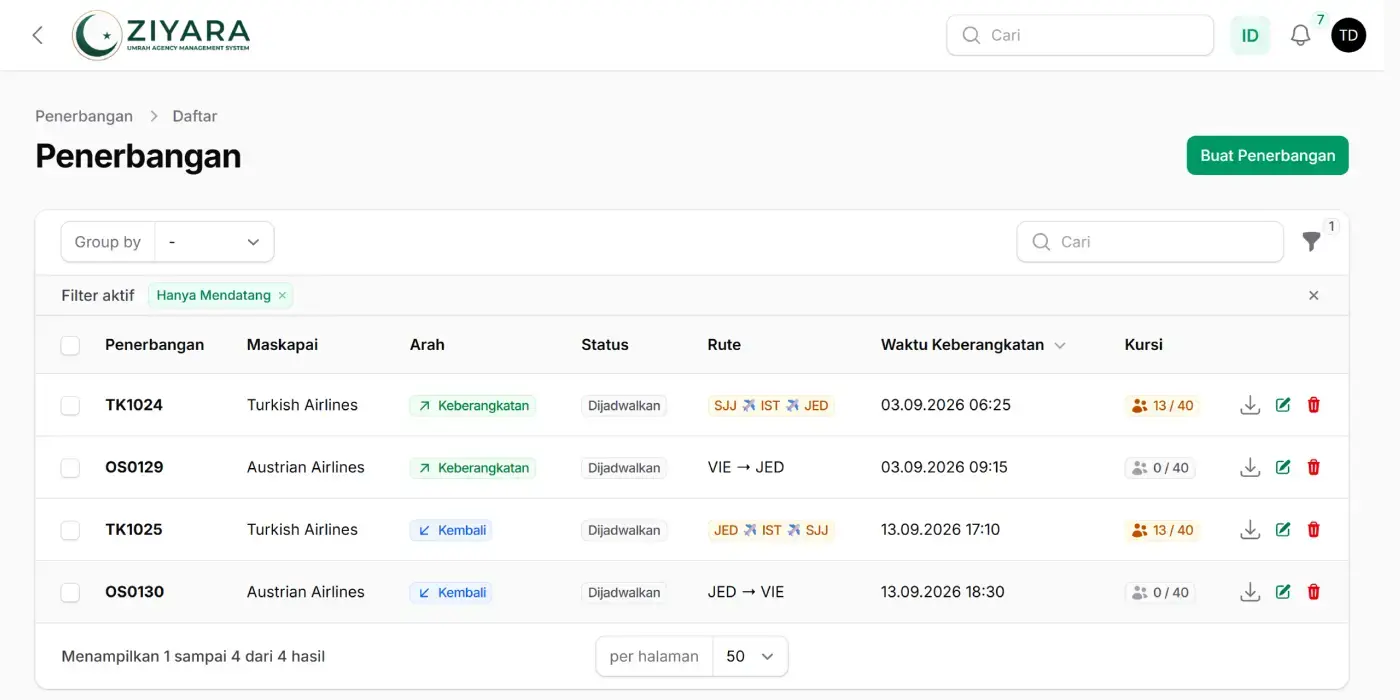
Hanya jamaah disetujui yang disertakan, dan datanya berasal dari profil terenkripsi yang sama yang dipakai pembagian kamar dan ekspor visa — diinput sekali, diverifikasi sekali, tak pernah diketik ulang. Saat penumpang berganti dua hari sebelum berangkat, Anda memperbarui satu profil dan membuat ulang manifes dalam hitungan detik.
Uji seluruh alurnya di uji coba gratis: tambahkan jamaah, buat penerbangan, lalu unduh PDF ber-watermark dan file persiapan Excel dalam batas uji coba. Periksa keduanya terhadap persyaratan terbaru maskapai.
Pertanyaan yang sering diajukan
Data apa saja yang ada di manifes penerbangan grup?
Untuk setiap penumpang: nama lengkap persis seperti di zona baca mesin paspor, nomor paspor, kewarganegaraan, tanggal lahir, masa berlaku paspor, dan jenis kelamin, ditambah nomor tiket serta permintaan layanan khusus yang diminta maskapai. Urutan kolom dan format file berbeda-beda per maskapai, jadi mulailah dari template maskapai itu sendiri.
Kapan maskapai membutuhkan manifes grup?
Sebelum batas waktu penyerahan nama dalam kontrak grup Anda, yang sering beberapa minggu sebelum keberangkatan dan bisa lebih awal pada musim ramai seperti Ramadan. Setelah batas itu, perubahan nama biasanya dikenai biaya atau ditolak, jadi itulah batas nyata untuk mengganti jamaah yang batal.
Berapa lama masa berlaku paspor untuk masuk Arab Saudi?
Paspor harus berlaku minimal enam bulan sejak tiba di Arab Saudi. Periksa masa berlaku saat pendaftaran, bukan saat menyusun manifes: pembuatan paspor baru butuh berminggu-minggu, dan paspor yang ketahuan hampir habis di konter membuat jamaah kehilangan kursinya.
Bisakah satu file dipakai untuk maskapai, operator Saudi, dan visa?
Datanya bisa, file-nya biasanya tidak. Setiap penerima meminta kolom dan formatnya sendiri, karena itu data paspor sebaiknya tersimpan di satu tempat dan setiap file dibuat dari data itu, bukan disalin dari template ke template.
Sumber
Panduan ini ditulis dan diterjemahkan dengan bantuan alat kecerdasan buatan (AI). Jika Anda menemukan kesalahan pada isi atau terjemahan, kirim email ke info@ziyara.io


